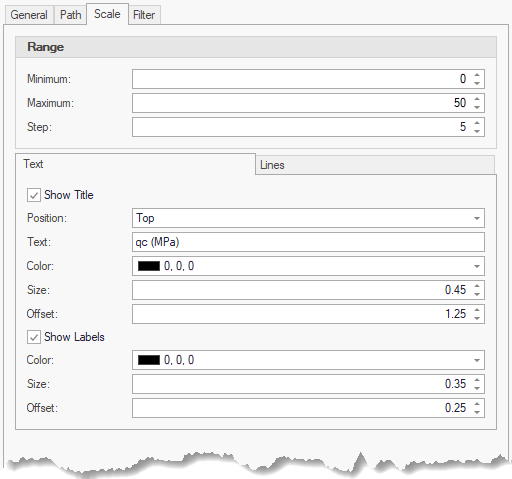
The Scale tab is shown when the Type is a Cylinder, Path or Symbol:
|
Scales are globally turned on/off by the Show Scales option in the Database Settings. Scales are drawn to the Hole Depth value defined in the database. |

Range
•Minimum - sets the minimum value of the range
•Maximum - sets the maximum value of the range
•Step - sets the size of the step between scale objects - i.e. 5 labels / lines will be drawn in the example above
Text
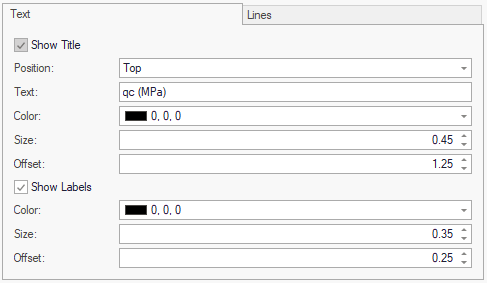
Title
•Show Title - sets if the title object is drawn
•Position - defines where the labels will be shown (top or bottom)
•Text - sets the text to be written
•Color - sets the text color
•Size - sets the text size in drawing units
•Offset - sets the vertical offset from the text
Labels
•Show Labels - sets if value labels are drawn
•Color - sets the text color
•Size - sets the text size in drawing units
•Offset - sets the vertical offset from the text
Lines
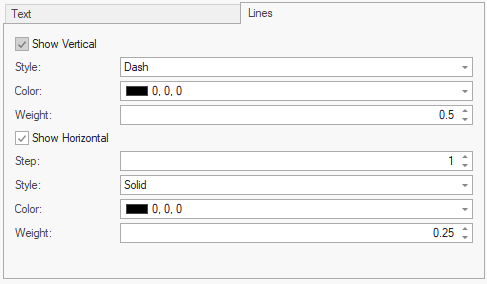
Vertical - value lines
•Show Vertical - sets if vertical lines are drawn
•Style - sets the line style (solid, dot, dash)
•Color - sets the line color
•Weight - sets the line weight in drawing units
Horizontal - depth lines
•Show Horizontal - sets if horizontal lines are drawn
•Step - sets the step between horizontal lines
•Style - sets the line style (solid, dot, dash)
•Color - sets the line color
•Weight - sets the line weight in drawing units